Microchip On-board Touch Sensor
Overview
This sample demonstrates the use of a self-capacitance touch button available on Microchip evaluation kits. The touch button is intended to be driven by the devices built-in Peripheral Touch Controller (PTC).
The sample uses Zephyrs input subsystem and generates input events when the touch button is pressed or released.
For hardware details, refer to the Microchip evaluation kit user guide.
Requirements
A Microchip evaluation kit with an on-board self-capacitance touch button
A Microchip MCU with a supported Peripheral Touch Controller (PTC)
A device tree configuration that defines the required PTC node, example:
ptc.
Touch Configuration (Kconfig)
The following Kconfig options must be enabled for touch operation:
Mandatory options:
CONFIG_INPUTEnables the Zephyr input subsystem.CONFIG_INPUT_MCHP_TOUCHEnables the Microchip touch driver.CONFIG_INPUT_MCHP_TOUCH_EN_BTTN_MODULEEnables the touch button module.CONFIG_INPUT_MCHP_TOUCH_EN_FREQ_HOPEnables Frequency Hopping for noise avoidance.
Optional options:
CONFIG_INPUT_MCHP_TOUCH_EN_FREQ_AUTO_TUNEEnables Frequency Hopping with Autotune.Frequency Hopping with Autotune is the recommended configuration for robust touch operation. This feature operates autonomously and provides the flexibility required to counteract electrical noise in real-world environments.
The Autotune module is a superset of Frequency Hopping. In addition to frequency variation, it continuously monitors noise and automatically tunes the touch acquisition frequency.
The touch controller performs measurements on multiple frequencies (by default three, or as configured by the host). Noise levels are monitored for each frequency. If the noise on a given frequency exceeds the configured Noise Threshold for a defined number of integrations, that frequency is replaced by another frequency from the available frequency pool.
Prerequisites
Before building the application, make sure you have updated your workspace and fetched any required binary blobs
west update hal_microchip
west blobs fetch hal_microchip
Building and Running
This is a generic sample and should work with any Microchip evaluation kit that provides on-board touch sensors and a touch controller supported by Zephyr, provided the required device tree bindings are configured.
Before building the sample, make sure all required modules and binary blobs are available.
Once the workspace is prepared, you can build and flash the application using the following command:
west build -b pic32cm_jh01_cpro samples/subsys/input/input_capacitive_touch_buttons
west flash
Expected Behavior
Touching the capacitive button generates input press and release events
On-board LED status will change when the touch button is pressed or released
Data Streaming and Visualization
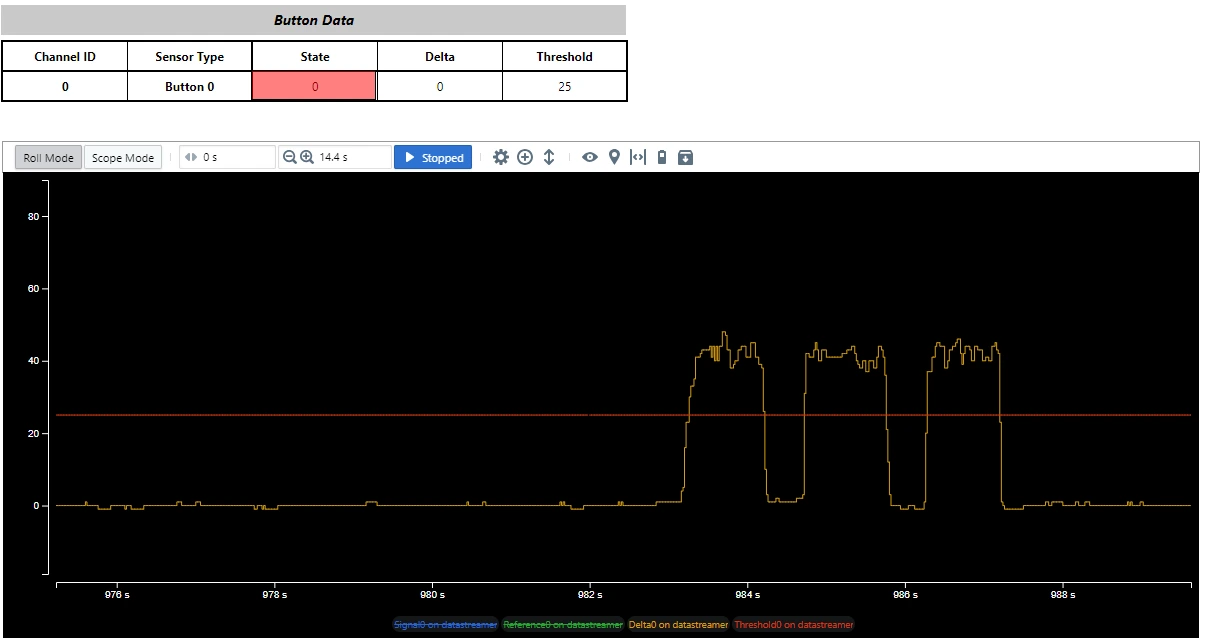
Touch debug data can be streamed to a host PC and visualized using the Microchip Data Visualizer tool, which presents touch parameters in a graphical user interface (GUI).
To enable data streaming, the following configuration options must be enabled:
CONFIG_INPUT_MCHP_TOUCH_DATASTREAMER_UNI_DIRCONFIG_SERIAL
When enabled, touch data is transmitted over the serial interface and can be viewed in the Data Visualizer GUI.
Detailed instructions for installing and using the Data Visualizer tool are available at the link follows.
Note: 1. Refer to the section Data Visualization 2. Required datastremer files are available in the sample application directory
Visualize Touch Data Using - MPLAB Data Visualizer